MCP server
Sanctions Screening MCP Server for Claude
Screen names against 10 official sanctions lists from a chat in Claude. SanctionListCheck is a remote MCP server: add it once as a custom connector, then ask in plain words, for example “Screen the name Vladimir Putin.” A new email address gets 100 free credits, and one screened name costs 1 credit.
Server URL
https://sanctionlistcheck.com/mcp- Works in
- Claude on the web, desktop and mobile, Claude Code and Cursor
- Sign-in
- Your email address and a 6-digit code. Claude needs no API key.
- Cost
- 100 free credits for a new email address. Then packs from €15.
How it works
You ask Claude
Type a request in a chat, for example: “Screen these names against the sanctions lists.” Claude sends the names to SanctionListCheck.
We check 10 lists
Our engine compares each name with the names and aliases on the 10 lists, in the latest daily data. It also finds other spellings and word orders. The matching uses no AI model.
You review the hits
Claude shows each hit with its score, its list and a record ID. Ask Claude to open the record again with that ID.
A hit is a possible match for a person to review.
Each screening is saved as a record: the names, the hits, the date of each list and the engine version. The screened names in a record are kept for 90 days by default.
The 10 lists
OFAC SDN, the US Consolidated Screening List, the EU consolidated list, the UK Sanctions List, the UN Security Council Consolidated List, and the national lists of France, Poland, Switzerland, Canada and Australia. We fetch each list from its official publisher every day. How we screen links each source and explains the matching and its limits.
Add it to Claude as a custom connector
You need a Claude plan with custom connectors: Free, Pro, Max, Ultra, Team or Enterprise. The Free plan allows one custom connector. On Team and Enterprise plans, an Owner adds the connector first (see below).
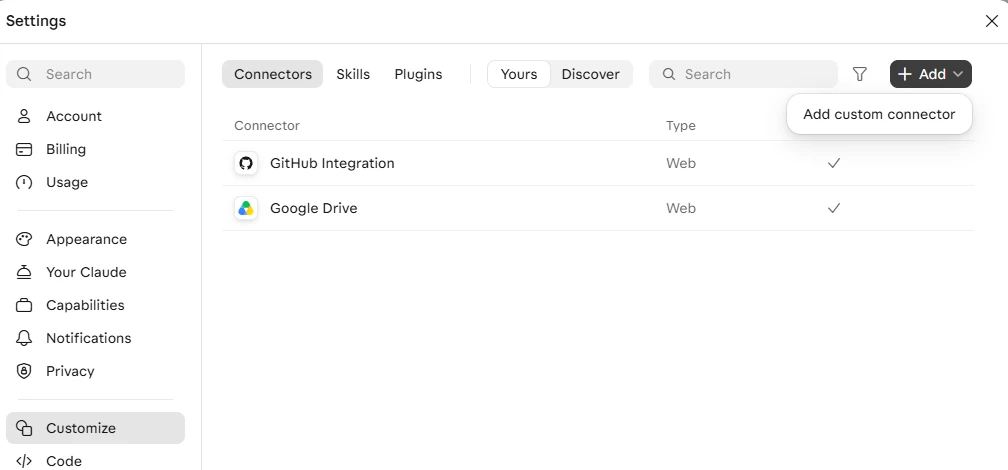
- In Claude, open Customize > Connectors.
- Select Add, then Add custom connector.
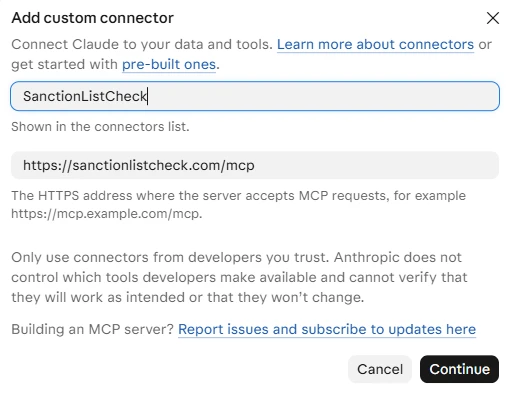
- Enter the name SanctionListCheck and paste the server URL
https://sanctionlistcheck.com/mcp. Select Continue, then Add. - Select Connect. Our sign-in page opens.
- Enter your email address and select Send code. A short browser check runs first.
- Enter the 6-digit code from the email. The code works for 10 minutes.
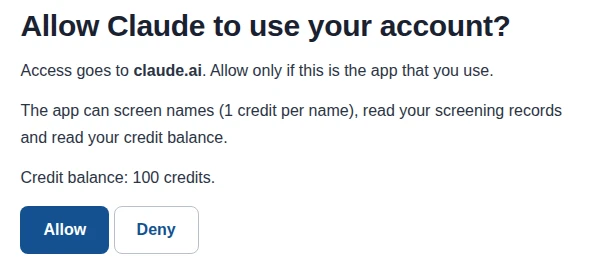
- Select Allow. Claude shows SanctionListCheck as connected.
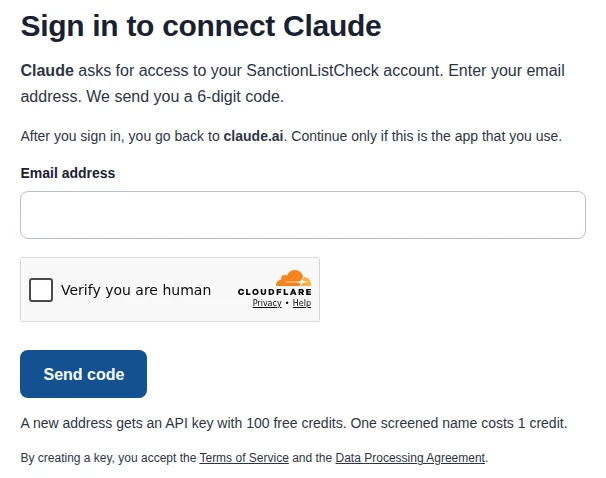
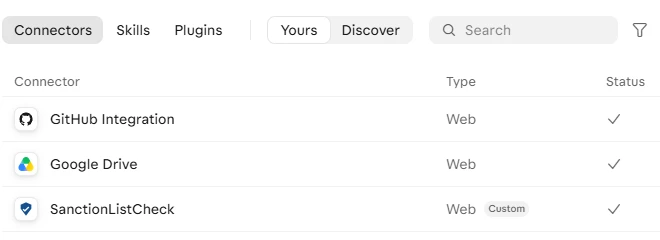
A new email address gets 100 free credits. If you already have an API key, sign in with the email address of that key, and Claude uses its credits.
After you connect, SanctionListCheck works in Claude on the web, in the desktop app and in the mobile apps. To turn it on or off in a chat, select the + button, then Connectors.
Team and Enterprise plans
An Owner adds the connector in Organization settings > Connectors. Each member then selects Connect and signs in with their own email address.
A real example
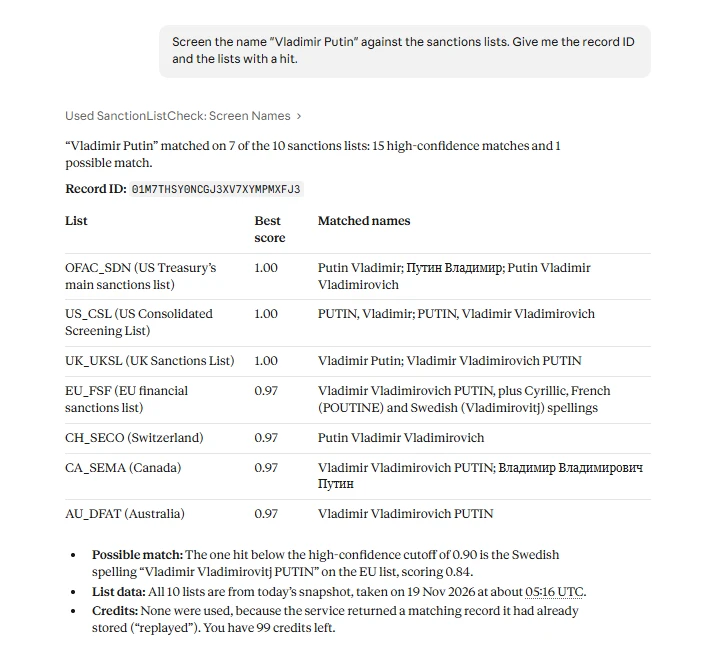
On 19 November 2026 we asked Claude Code to screen “Vladimir Putin” as a person. The screening used 1 credit and returned this result:
| Record ID | 01M7T1024CGFZF8TC97T267Y79 |
|---|---|
| List data | All 10 lists as fetched on 19 November 2026, 05:16 UTC |
| Lists with a hit | 7 of 10: OFAC SDN, US CSL, EU, UK, Switzerland, Canada, Australia |
| Lists without a hit | UN Security Council, France, Poland |
| Hits | 16: one for each name form that matched. One list entry can have several name forms. |
| Scores | 1.00 for “Putin Vladimir” (OFAC SDN) and “Vladimir Putin” (UK); 0.97 for the full name with the patronymic; 0.91 for the French spelling “Vladimir Vladimirovich POUTINE” (EU); 0.84 for “Vladimir Vladimirovitj PUTIN” (EU) |
The full record also names the list entry of each hit, for example OFAC_SDN:35096, with the date of birth and the reason for the listing. Claude Code and the API show these fields. With them, a reviewer finds the entry on the official list.
What you can ask
Ask these in a chat where SanctionListCheck is on. Use your own names in the first one. Ask the third one in the same chat, after a screening.
- Screen these names against the sanctions lists: Vladimir Putin, Maria Ivanova. Give me the record ID and the lists with a hit.
- Which sanctions lists do you check, and what is the data date of each list?
- Fetch the record of my last screening and list the hits with a score of 0.95 or higher.
- How many credits do I have left?
What it costs
A new email address gets 100 free credits. One screened name costs 1 credit. To open a record, list the sources or check your balance costs nothing.
| Pack | Credits | Price | Price per name |
|---|---|---|---|
| Starter | 500 | €15 | €0.030 |
| Growth | 2,500 | €60 | €0.024 |
| Scale | 10,000 | €200 | €0.020 |
Each pack is a one-time purchase, not a subscription. Credits do not expire while your API key is active.
How to buy credits
- Ask Claude: “How many credits do I have left?” Claude shows your balance.
- Ask Claude for the checkout link.
- Open the link, choose a pack and pay. The link works for 24 hours.
When your credits run out, Claude gets an error with the same kind of link.
Troubleshooting
The code email does not arrive
The email comes from noreply@sanctionlistcheck.com. Wait a few minutes and look in your spam or junk folder. Some company mail filters hold mail from a new sender: ask your IT team to let it through. We send at most 3 codes to one address per hour and 10 per day (UTC). After that, the page says “We sent 3 codes to this address in the last hour.”
“This code is not correct” or “This code cannot be used any more”
A code works for 10 minutes and allows 5 tries. Select Send a new code and use the newest email.
“This sign-in expired”
The sign-in page works for 15 minutes. Go back to Claude and select Connect again.
“Use the exact address of your API key”
You already have an API key for another form of this address, for example the same address with a +tag, or a Gmail address with dots in other places. Sign in with the exact address that you used for the key, or write to support@sanctionlistcheck.com.
“This email domain is not accepted”
We do not accept addresses from disposable email services. Use your work or personal address.
“Too many codes were requested from this network in the last hour”
One network can ask for 10 codes per hour. Wait one hour, or use another network.
Claude shows “Couldn't reach the MCP server” or another connection error
Check that the server URL is exactly https://sanctionlistcheck.com/mcp. If it is, remove the connector and add it again: you cannot change the sign-in settings of a connector after you add it. If the error stays, write to support@sanctionlistcheck.com with the reference ID that Claude shows.
Claude does not use SanctionListCheck
In the chat, select the + button, then Connectors, and check that SanctionListCheck is on. Then name the task, for example: “Use SanctionListCheck to screen these names.”
Claude Code: after Allow, the browser cannot open a localhost page
This happens when Claude Code runs on another machine, for example a server that you use over SSH. Copy the full address from the address bar and paste it into the prompt in Claude Code, or use claude mcp login sanctionlistcheck --no-browser.
Questions
Do I need to be technical?
No. You add the connector once in the Claude settings, then you ask in plain words. You do not write code, and Claude needs no API key.
Is there an MCP server for sanctions screening?
Yes. SanctionListCheck runs a remote MCP server at https://sanctionlistcheck.com/mcp. It screens names against 10 official sanctions lists. Claude, Claude Code, Cursor and other MCP clients can use it.
Does the AI model decide if a name matches?
No. Claude sends the names to SanctionListCheck and shows the result. Our matching engine scores each name against the list data, and the matching uses no AI model. A person reviews each hit. How we screen explains the method.
What data does SanctionListCheck receive and keep?
Only what Claude sends for the screening: the names, and the country, date of birth and type when you give them. It does not receive the rest of your chat. The screening record keeps the names for 90 days by default. The Privacy Policy has the details.
Do I need an API key?
Not for Claude and Claude Code. You sign in with your email address and a 6-digit code, and the sign-in creates the key for you. Cursor and scripts use an API key: see For developers.
Does it work with ChatGPT?
We have not tested ChatGPT yet.
Is there a REST API?
Yes. The same screening is available as a REST API with an API key. See the developer page.
How do I get help?
Write to support@sanctionlistcheck.com. Include the record ID or the exact error text.
For developers
The server uses MCP over Streamable HTTP at https://sanctionlistcheck.com/mcp. A client with OAuth support signs in with the email code: the server supports OAuth 2.1 with dynamic client registration and S256 PKCE. Other clients send an API key in the header Authorization: Bearer YOUR_API_KEY.
Claude Code
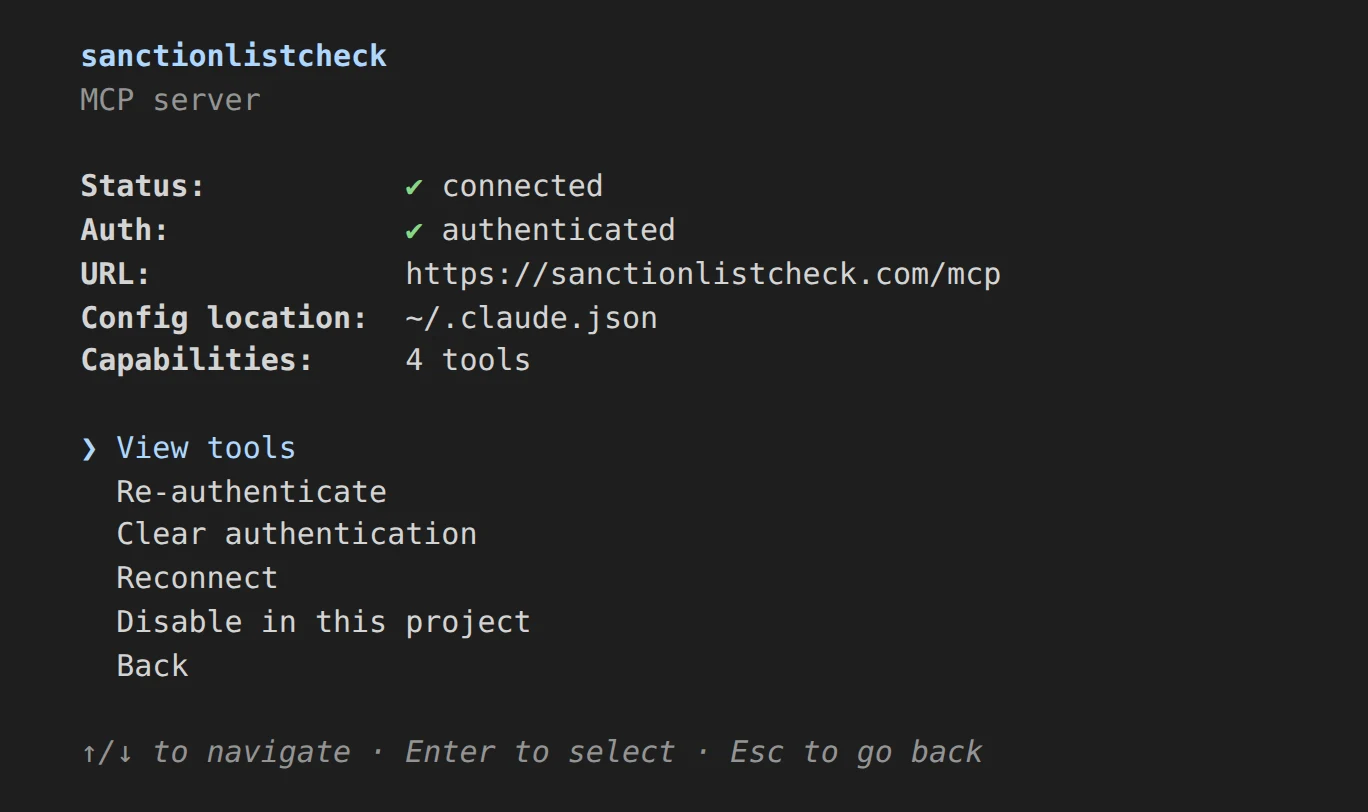
claude mcp add --transport http sanctionlistcheck https://sanctionlistcheck.com/mcpAdd --scope user to use the server in all your projects. Then start Claude Code, type /mcp, select sanctionlistcheck and sign in. Your browser opens our sign-in page.
If you added the connector in Claude and you sign in to Claude Code with the same claude.ai account, Claude Code shows the connector too. You do not need to add it twice.
Claude Code on a server without a browser (SSH)
claude mcp login sanctionlistcheck --no-browserConnect with ssh -t, because the command asks you to paste a URL. Open the printed URL on your own computer and sign in. After you select Allow, the browser goes to a localhost address that does not load. Copy the full address from the address bar and paste it at the prompt.
Cursor
Cursor uses an API key. Get a key (see the next part), and set it as the environment variable SLC_API_KEY in your shell profile. Then add this to ~/.cursor/mcp.json for all projects, or to .cursor/mcp.json for one project:
{
  "mcpServers": {
    "sanctionlistcheck": {
      "url": "https://sanctionlistcheck.com/mcp",
      "headers": { "Authorization": "Bearer ${env:SLC_API_KEY}" }
    }
  }
}API key and other MCP clients
Request a key on the developer page, or with this command. The key arrives by email.
curl -X POST https://sanctionlistcheck.com/v1/keys -H "Content-Type: application/json" -d '{"email":"you@example.com"}'This command lists the tools with the key:
curl -s https://sanctionlistcheck.com/mcp \
  -H "Authorization: Bearer $SLC_API_KEY" \
  -H "Content-Type: application/json" \
  -H "Accept: application/json, text/event-stream" \
-d '{"jsonrpc":"2.0","id":1,"method":"tools/list"}'A retry with the same idempotency key within 24 hours returns the stored record and uses no credits. For plain HTTP calls without MCP, use the REST API: see the developer page and the OpenAPI file.
The 4 tools
screen_names | Screen Names Sanctions screening of 1 to 100 names against 10 official lists. The response includes a record id, the snapshot version, the data-as-of date for each source list, and the matching engine version. Each screened name costs one credit. Hits are candidates for human review and require further assessment. |
get_record | Get Screening Record Fetch a previously stored screening record by its record id. This tool is free to use. |
list_sources | List Source Lists The 10 official sanctions lists in the current daily snapshot, with the data-as-of date of each list. This tool is free and uses no credits. |
get_balance | Get Credit Balance The credit balance of your API key, its latest credit movements, and a link to the checkout page for more credits on sanctionlistcheck.com. This tool is free to use. |